Merge data of two excel files into a single file using python
SCENARIO:YOU HAVE TWO DIFFERENT EXCEL FILES WITH LOT OF ROWS AND COLOUMN ,
BUT YOU ONLY TWO PARTICULAR COLOUMN OF THESE TWO FILES TO BE COMBINED TOGETHER.
Tip: Before starting to work with excel and python together make sure to install these libraries in python.
1.pandas
2.xlsxwriter
3.xlrdpip
4.openpyxl

Use below code to merge two excel files data

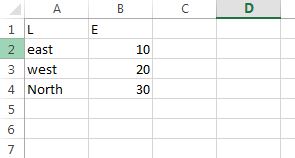
#create two excel files test1 and test2 or use any already exiting files
import pandas as pd

excel1 = 'test1.xlsx'
excel2 = 'test2.xlsx'

df1 = pd.read_excel(excel1)
df2 = pd.read_excel(excel2)

#values of data frames to be merged from files
values1 = df1[['L','E']]
values2 = df2[['L','E']]

dataframes = [values1, values2]
#concatenate/merge the values
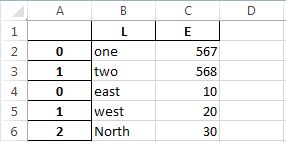
join = pd.concat(dataframes)
#write the values into a new file with name output
join.to_excel("output.xlsx")

 Freshness Blog
Leave a comment